How I Built a Knowledge Graph of Joe Hudson's Work
Introduction — Why Build a Knowledge Graph of One Person’s Work?
Joe Hudson is an executive coach to many of the world’s top CEOs and business leaders. His work is very emotion-oriented, focusing on getting to emotional fluidity and emotional clarity in order to benefit any area of our life, including business. He offers courses, a podcast, and a YouTube channel to make his work more approachable to a wider audience. This article from Every is a good introduction to his work and what it means. I have personally been engaging with his work since 2023 and have found it to be very helpful across a variety of fronts. It is very different from the kind of “work” that people are probably used to, in the form of therapy or personal development. But that’s one of the things that gives his perspective its power.
Simultaneously, I’ve been very interested in how to leverage AI to help people learn and grow. I have a thesis developing around knowledge graphs and AI that I’m starting to really tinker with, all with the goal of finding ways to leverage AI for real learning. At the very least, knowledge graphs are a very powerful tool for understanding an area of knowledge. That is to say: there’s a lot of potential here. I’ve been playing around with a few experiments with knowledge graphs, one of which was to build a graph of Joe Hudson’s publicly available content, which is what I’d like to describe here.
You can access the graph itself here.
What Is This?
I’ve been interested in different forms of knowledge graphs for a while and have written extensively about Roam Research, Zettelkasten, and knowledge graphs for personal knowledge management. One of the things that I’m excited about with AI is the ability to build knowledge graphs that are a step larger. First: what does it look like to build a knowledge graph for a canon?
Joe Hudson’s Art of Accomplishment YouTube channel has roughly 300 videos. They span coaching sessions, podcast episodes, interviews, and standalone teachings. The topics range across emotions, relationships, shame, anger, fear, leadership, self-awareness, purpose, and presence. And the ideas are deeply interconnected — a concept from a coaching session about anger can illuminate something said about leadership months later.
But YouTube is linear and siloed. There’s no way to trace ideas across the catalog. You watch one video, maybe take some notes, and then the next video starts and the previous one recedes. The connections stay buried.
What I wanted was something different: a Zettelkasten-style knowledge graph where every atomic concept links to related concepts and back to its source video. Click into one teaching and follow connections you’d never find browsing YouTube. A browsable, searchable website with a visual graph showing how ideas connect.
Here’s what I ended up with: 296 source notes, 1,248 atomic teaching notes, 10 curated topic pages, and thousands of cross-links. I was able to build the entire thing in about three days and push it live to aoa.zkf.io.
I want to quickly note here that this is a fan project. All of the content is from Joe’s publicly available YouTube videos and belongs to him. I built this because I wanted to understand his work more deeply, and because I think the approach has implications beyond just one creator’s catalog.
Collecting the Sources — 300 Videos, One Channel
The first step was getting transcripts for every video on the Art of Accomplishment YouTube channel.
I used yt-dlp to download the auto-generated VTT subtitles:
yt-dlp --write-auto-sub --sub-lang en --skip-download --sub-format vtt \
  -o "transcripts/%(id)s" "https://www.youtube.com/watch?v=VIDEO_ID"
YouTube’s auto-generated subtitles are surprisingly usable. They have quirks — repeated lines across cues, occasional garbled words, no speaker labels — but for extracting concepts, they’re good enough. I parsed the VTT files, stripped the headers and timestamps, and deduplicated the repeated lines. 580+ transcript files ended up in a /transcripts/ directory.
The video library ranges from 1-minute shorts to 100+ minute podcast episodes. The channel’s content breaks down roughly into: 108 podcast episodes, 95 standalone lessons, 87 coaching sessions, and 5 guest appearances. (I added the categorization later, but it helps to know what we’re working with.)
I also attempted a transcript reformatter pipeline using faster-whisper and pyannote for speaker diarization — the idea being that better transcripts with speaker labels would improve extraction quality. That pipeline got blocked by YouTube 403 errors on audio downloads. The auto-generated VTT subtitles turned out to be sufficient, so I moved on.
Creating Source Notes — Structured Video Summaries
Every video got a source note. Think of it as the “hub” page for that video — it links outward to the individual teachings extracted from it, and it anchors those teachings to a specific source. In the Zettelkasten pattern, these are analogous to Reference Notes.
Each source note follows a template:
---
title: "Video Title"
source: https://www.youtube.com/watch?v=VIDEO_ID
videoId: "VIDEO_ID"
type: teaching|coaching-session|interview
duration: "M:SS"
category: "Short Lesson|Podcast Episode|Coaching Session|Guest Appearance"
topics: [topic1, topic2]
date: 2026-01-27
---
Followed by an embedded YouTube player, a 2-3 paragraph AI-generated summary, key concepts as wiki links to extracted teaching notes, 3-6 notable quotes from the transcript, and the full cleaned transcript text.
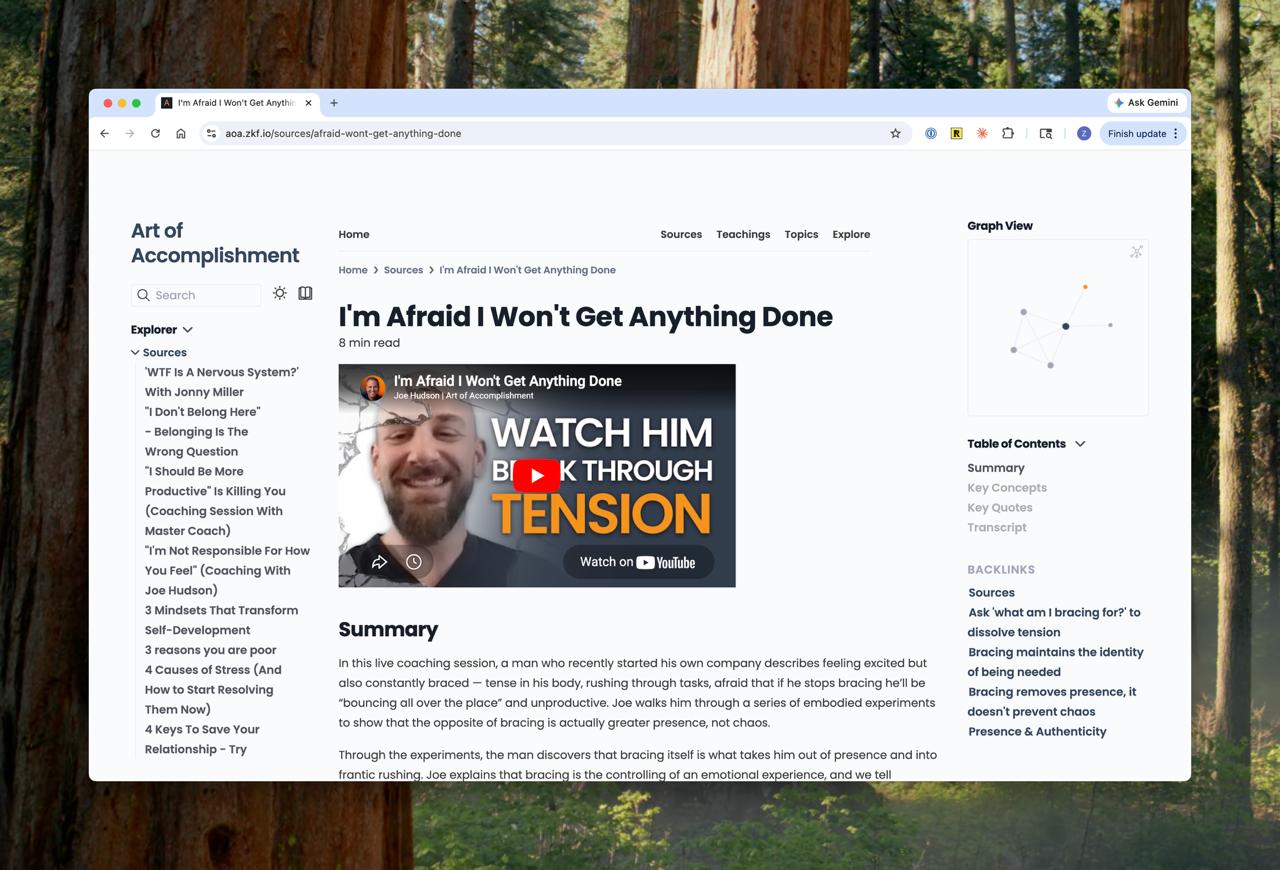
I used Claude Code to process each video’s transcript and metadata, generate summaries, identify key concepts, select quotes, and create the final markdown files with proper frontmatter and wiki links.
Including the full transcript makes the site fully searchable and self-contained. You don’t need to leave the graph to check what Joe actually said — it’s right there in the source note.
Extracting Teachings — 1,248 Atomic Ideas
This is where the Zettelkasten principle kicks in: one idea per note. Each note represents an atomic, self-contained concept.
I borrowed the titling approach from Andy Matuschak’s Evergreen Notes. Matuschak argues that note titles should be complete phrases, not labels. A title like “Acceptance vs Love” tells you the general neighborhood but nothing specific. A title like “Getting to acceptance without love repeats the pattern” carries the idea itself. You can read it and know what the note is about before you click. Matuschak calls this sharpening the claim — the title puts pressure on you to actually support it in the body, and when you can’t articulate a sharp title, that’s a sign the thinking is still muddy or the note is about several things at once. I found this to be true: the teachings with the clearest titles were the ones that needed the least revision.
Each teaching note has 2-4 paragraphs of explanation with relevant quotes from the transcript, plus a Related Concepts section with wiki links to other teachings, and a Source link back to the source note.
How many teachings per source? It depends entirely on the content. A 5-minute video with one core idea gets 1 note. A 30-minute coaching session might have 8. A 3-hour deep dive could have 20+. The average worked out to roughly 4.2 teachings per source (1,248 teachings across 296 sources). But the key thing here was having Claude outline each source to extract the key teachings, then summarizing those teachings. An earlier iteration of this process gave the LLM guidelines for how many notes to create per source, but those quickly became metrics and the note quality suffered.
Getting through all the sources required creating subagents to work in batches. Videos were processed in batches of 3, and each batch checked for connections to prior batches. This kept quality consistent and ensured that cross-linking happened at creation time, not as an afterthought. The batching also made the process manageable — 72 batches planned, processed in sessions over about two days.
Not everything went perfectly. 25 literature notes ended up orphaned (not properly linked to any source). 14 reference notes needed a second pass because they were incomplete. One welcome video got removed entirely because it was a 1-minute channel trailer with no substantive content. But these were caught and fixed quickly because the batch approach made quality control straightforward.
Connecting Notes — Semantic Similarity at Scale
Manual cross-linking during creation catches obvious connections. A teaching about shame in one video clearly relates to a teaching about shame in another. But with 1,248 notes, there are 778,128 possible pairs. Impossible to check manually. Many conceptual connections are non-obvious — a coaching session about anger connecting to a podcast about leadership, or a teaching about self-awareness illuminating something about boundaries.
This is where embedding-based semantic links come in.
I built a custom Python pipeline (semantic_links.py) that does the following:
- Parse all 1,248 teaching notes and extract body text
- Strip wiki link syntax but keep text content
- Generate normalized embeddings using BAAI/bge-base-en-v1.5 (a sentence transformer optimized for retrieval)
- Compute cosine similarity across all note pairs
- For each note, find the top matches above a similarity threshold
The threshold was 0.80 cosine similarity — relatively high, which ensures strong conceptual overlap rather than loose thematic resemblance. I capped it at 5 links per note maximum.
806 notes got updated with new connections. That’s 65% of all teaching notes enriched with non-obvious links that manual cross-referencing would never have found.
The script also has diagnostic features: report shows the similarity distribution and sample connections, inspect <slug> shows the top 20 connections for a specific note, and apply writes links to files (with a dry-run default so you can inspect before committing). This dry-run-first workflow was critical — I could verify the quality of connections before writing anything to 800+ files.
Later, I stripped the brief descriptions from the link text, leaving just the wikilink for cleaner presentation. 1,119 files updated. But the connections themselves — those stayed.
The Topic Pages
The Topic pages are the most “authored” parts of the site. 10 curated topic pages — Purpose & Meaning, Presence & Authenticity, Emotions & Emotional Processing, Self-Awareness & Self-Discovery, Relationships & Connection, Shame & Self-Criticism, Anger & Boundaries, Fear & Anxiety, Leadership & Business — each with a 600-1,200 word rich summary weaving together dozens of teaching links into a coherent narrative.
These are the entry points. The graph view shows you the structure, search lets you find specific ideas, but the topic pages walk you through related concepts in a way that browsing individual notes can’t. The Emotions topic page alone weaves together 40+ teaching links into a single essay about emotional processing.
The Graph View
The knowledge graph visualization is what makes this feel different from a wiki or a blog. You see clusters of related teachings, you see which concepts are hubs with many connections, you see the structure of Joe’s body of work emerge visually. I increased the spacing and repulsion for better readability and made labels hover-only to reduce clutter.
The Pipeline in Summary
Here’s the full assembly line, start to finish:
- Scrape — yt-dlp downloads auto-generated VTT subtitles for each video
- Parse — VTT files cleaned: strip timestamps, deduplicate repeated lines
- Generate Source Notes — Claude reads each transcript, produces a structured reference note with summary, key concepts, quotes, and full transcript
- Generate Teaching Notes — Claude extracts atomic ideas, writes them as standalone notes with cross-links
- Batch Processing — Videos processed in batches of 3, checking connections to prior batches
- Quality Control — Fix orphaned notes, reprocess incomplete sources, remove non-content
- Semantic Linking — Python script generates embeddings, computes similarity, adds connections (806 notes updated)
- Build Website — Quartz renders everything into a static site
- Polish — Rebrand, UX improvements, categorization, topic pages
- Deploy — Netlify, custom domain
Results and Reflections
By the Numbers
- 296 source notes (from ~300 videos, 3 unavailable, 1 channel trailer removed)
- 1,248 teaching notes
- 10 topic pages
- 806 notes enhanced with semantic links
- 0.80 cosine similarity threshold
- ~4.2 teachings per source on average
- 108 podcast episodes, 95 lessons, 87 coaching sessions, 5 guest appearances
The Bigger Picture
Here’s why I think this matters beyond just Joe Hudson’s catalog.
Knowledge graphs have a lot of interesting potential use cases, but have thus far been prohibitive to actually build. AI makes this tractable in a way it wasn’t before. The extraction, the structuring, the linking — these are tasks that would take a human months or years. An LLM can power through this in a few days. Not because AI is better than a human at understanding Joe’s work, but because AI is faster at the mechanical parts: reading transcripts, identifying concepts, writing structured notes, computing similarities.
This is a pattern I expect to see more of. Not just knowledge graphs of individual creators’ work, but knowledge graphs of academic fields, of philosophical traditions, of scientific literatures. Those are all just scaled up versions of the same pipeline: collect the sources, extract the ideas, link them together, build the interface, deploy.